Instalar o ZYBERMART

Abra qualquer ferramenta pela tela inicial ou pelo Dock, em uma janela própria. As ferramentas que você já usou também funcionam offline.

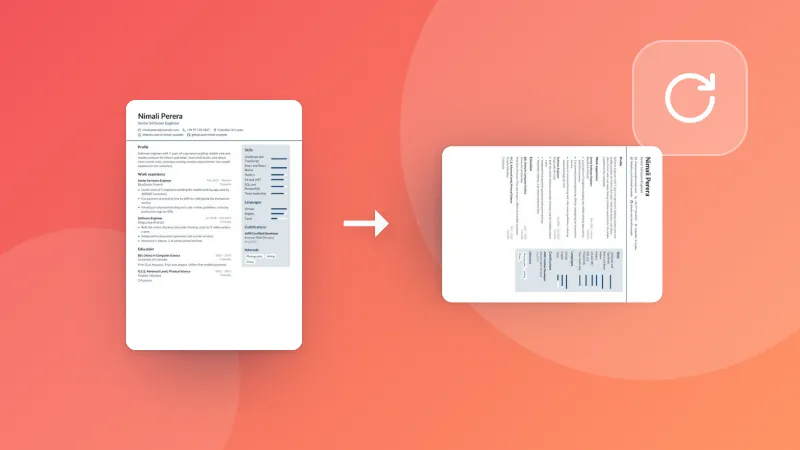
Redimensionar PDF

Mude o tamanho da página de um PDF para A4, Letter, Legal, A3, A5 ou personalizado, ajustando as páginas ou mantendo o tamanho.

How to resize PDF pages

  1. Pick the paper size you need (A4, Letter, A3 and more, or your own).
  2. Choose whether the content is scaled to fit, or kept at its size with margins.
  3. Choose your PDF. The resized PDF downloads straight away.

Printing several pages on one sheet? Use Pages per sheet. To cut off margins, use Crop PDF.

Frequently asked questions

How do I change a PDF from A4 to Letter?

Choose Letter, then your PDF. Each page is scaled to fit the new paper, keeping its shape, and centred, so nothing is cut off. Text stays sharp.

What does “Keep the size, add margins” do?

The pages keep their size and are placed on the new paper as they are: smaller pages get white margins around them, bigger ones are trimmed at the edges. Use it when the print size must stay exact.

Are landscape pages kept landscape?

Yes. With “Match each page”, landscape pages get landscape paper and portrait pages portrait paper.

Is my PDF uploaded?

No. The pages are resized in your browser.

Entrar no ZYBERMART

Tenha seus currículos, faturas, flashcards, notas e ferramentas salvas em todos os seus dispositivos. É grátis, e as ferramentas funcionam igual sem conta.

ou

Não precisa de senha. Ao entrar, você concorda com os termos; veja como tratamos seus dados na política de privacidade.

Sua conta

Ao sair, uma cópia do seu trabalho fica neste navegador. Em um computador compartilhado, limpe os dados do navegador depois.

O que você quer criar?

Designs

Redes sociais

Documentos

Estudos

Editar

Ver todas as 282 ferramentas