Instalar o ZYBERMART

Abra qualquer ferramenta pela tela inicial ou pelo Dock, em uma janela própria. As ferramentas que você já usou também funcionam offline.

Achatar PDF

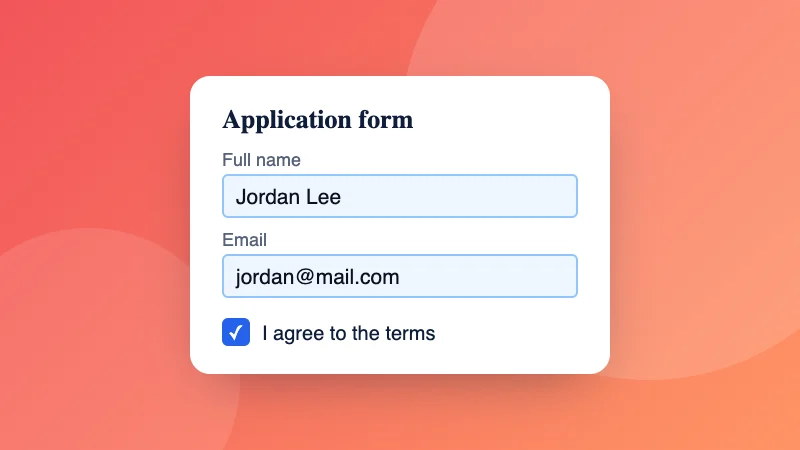
Achate um PDF para que formulários preenchidos, comentários e assinaturas façam parte da página e não possam ser alterados.

How to flatten a PDF

  1. Choose your PDF, for example a form you’ve filled in.
  2. Pick “Form fields only”, or “Everything, as pictures” to also lock in comments and signatures.
  3. Download the flattened PDF.

Need to fill in the form first? Use Fill PDF form. To stop others opening it, add a password.

Frequently asked questions

What does flattening a PDF do?

It makes the PDF look the same everywhere and stops it being changed easily. Filled-in form fields become ordinary text on the page, so the answers can't be edited and print correctly in every app.

Which option should I choose?

“Form fields only” keeps the text sharp and searchable, and suits filled-in forms you're sending back. “Everything, as pictures” also bakes in comments, stamps, highlights and signatures, and makes text impossible to edit or copy; the file is usually bigger.

Why do my form answers disappear in some apps?

Some phone apps and printers don't show form fields properly. Flattening turns the answers into page content, so they always show.

Is my PDF uploaded?

No. The PDF is flattened in your browser.

Can I flatten several PDFs at once?

Yes. Choose or drop several PDFs together: each one is flattened the way you choose and they download in one ZIP file.


Entrar no ZYBERMART

Tenha seus currículos, faturas, flashcards, notas e ferramentas salvas em todos os seus dispositivos. É grátis, e as ferramentas funcionam igual sem conta.

ou

Não precisa de senha. Ao entrar, você concorda com os termos; veja como tratamos seus dados na política de privacidade.

Sua conta

Ao sair, uma cópia do seu trabalho fica neste navegador. Em um computador compartilhado, limpe os dados do navegador depois.

O que você quer criar?

Designs

Redes sociais

Documentos

Estudos

Editar

Ver todas as 282 ferramentas